An AI email assistant for your organisation: a case study
Capucine receives a team's emails, archives its activities and answers its questions. Here is how she works, and why her limits are written into the code.
“Who was there? Was it March or April? Did anyone keep notes?” When it’s time to write an activity report, questions like these turn writing into detective work. The activities did happen, but their traces are scattered across calendars, inboxes and memories.
For a Belgian nonprofit, we designed Capucine: an AI assistant the team writes to by email, who archives every activity and then answers questions about what was done. About a hundred people use her today. Here is how she works, and what an assistant like this could do for your organisation.
An email address, and that’s it
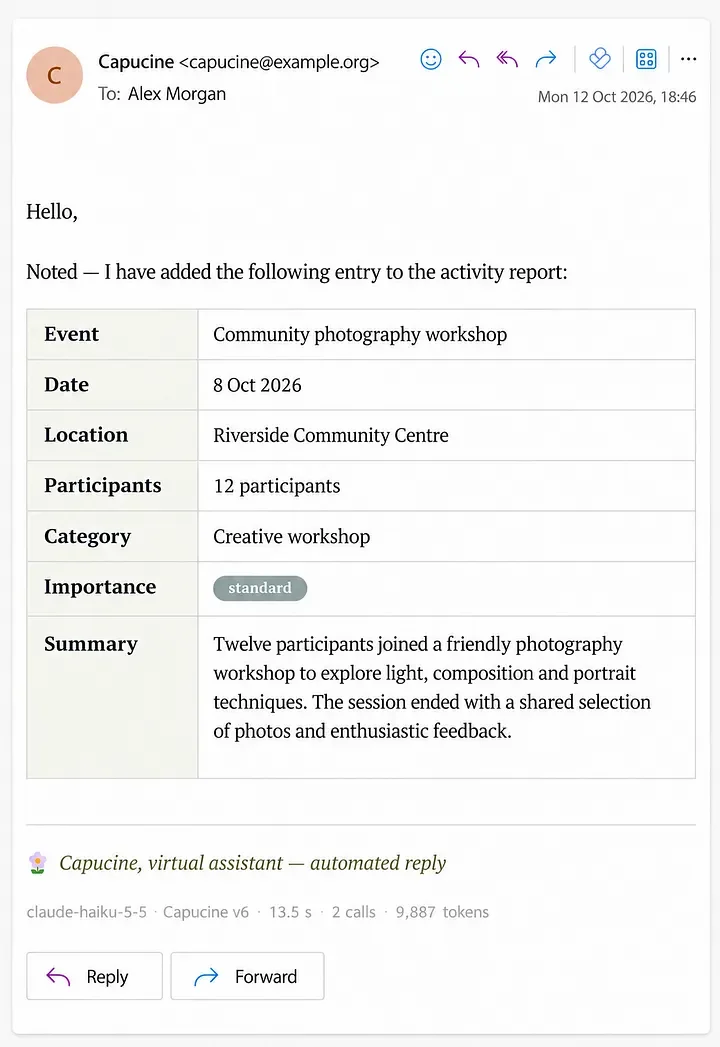
For the team, there is nothing to install and nothing to learn. After a workshop, Alex sends Capucine a few lines: the date, the place, what happened. A few minutes later, she replies with a summary record. You check it and correct it if needed. If essential information is missing, she asks for it.
The same address is used to ask questions: “What did we archive about the photography workshops in October?”, “Which activities involved Alex?”. Capucine rereads her archive and answers from what it contains. If she can’t find something, she says so.
Several people can tell the story of the same day: Capucine keeps each version and flags the details that differ. The annual report then becomes just one use of this collective memory among others: finding a past meeting, preparing a presentation, handing over the history of a project.
Her own account, not access to yours
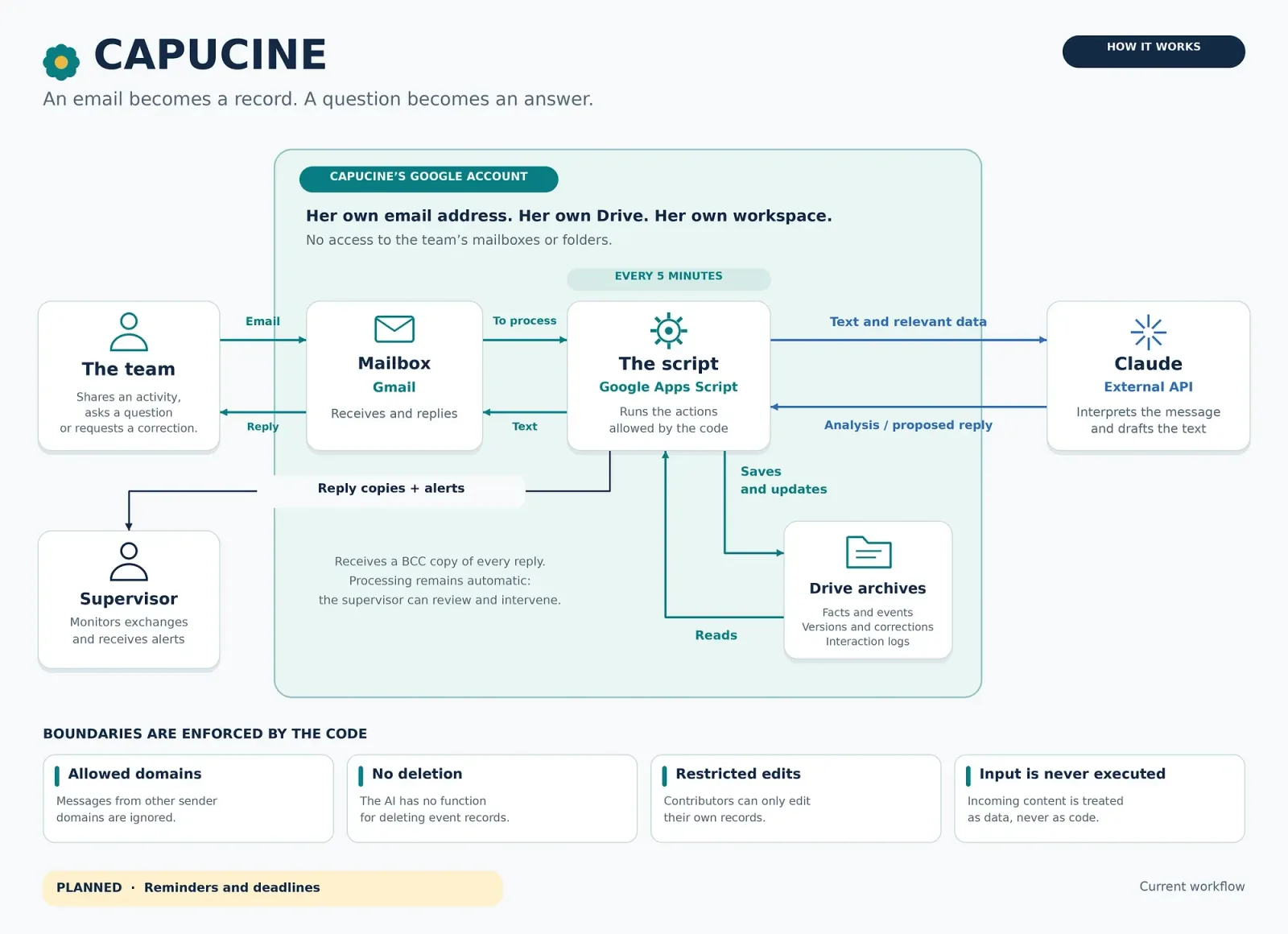
The most important choice in the project: Capucine has her own Google account, her own address, her own Drive. She has no access to the team’s mailboxes or folders. Everyone chooses what they pass on to her.
It is also a safeguard. If a message tries to manipulate her, it doesn’t open the door to the rest of the organisation’s documents.
On the technical side, a Google Apps Script checks her inbox every five minutes, asks Claude (Anthropic’s AI) to interpret the messages, then carries out only the operations the code allows. Activities are filed in monthly files.
The limits are written into the code
As soon as an AI can write to files or send emails, the real question is no longer “what can it say?” but “what can it do?”. We set those limits in the program, not only in the instructions given to the AI:
- Filtered senders: only messages from the organisation’s addresses are processed.
- Replies to the sender only: the AI never chooses the recipient.
- No deletion: the function simply doesn’t exist.
- Controlled corrections: everyone can only edit their own contributions, and the previous version is kept.
- Nothing is executed: the content of an email is always treated as text, never as a command.
- A human in copy: every reply goes as a blind copy to a supervisor, and suspicious messages trigger an alert.
These safeguards don’t make the AI infallible, but they limit what an error or a malicious message can cause. The text to be processed is sent to the AI’s API: we say so clearly, and we choose the architecture according to how sensitive your data is. As for running costs, processing one email costs less than a cent.
What Capucine taught us
One day, looking at two records about the same day, Capucine offered: “I can merge them if you confirm.” The sentence was natural, helpful, credible. But no merge function existed.
An AI can confidently offer an action it is unable to carry out. And where she saw a duplicate, there were in fact two colleagues telling the story of the same day. Her instructions were corrected: she now only offers what the code allows, and she brings accounts together without ever overwriting them.
That is why an AI project has to be designed on three levels at once: what it says, what the code allows it to do, and how we watch it at work.
And for your organisation?
Capucine was born from a nonprofit’s need, but the principle applies to many organisations, in Liège, in Brussels or elsewhere:
- a practice that wants to centralise the requests it receives by email;
- an SME that wants to keep track of its jobs or client meetings;
- a nonprofit that has to report on its activities to its funders;
- a team that wants to find information fast without digging through ten inboxes.
Our approach stays the same: start from your real tasks, choose the right tool without dogmatism, and write the safeguards before the functions. Sometimes the right answer is a simple automation, sometimes an assistant like Capucine, sometimes nothing at all.
Discover our artificial intelligence services, or get in touch to talk about it.